
Flipping over this mouse reveals one of the more atypical design decisions being made: the lack of a bottom shell. Instead of an entire underside, there is a thin frame around the circumference of the mouse that holds six feet in place. Between them is a chasm that reveals the entire PCB and battery.

Photograph: Henri Robbins
Of particular note is the PCB’s function inside the mouse: Instead of simply sitting inside of the shell, the PCB works as a primary structural component. Similar techniques have been used in designing supercars and sport bikes, with the Ferrari F50 using the engine block as a stressed member that provides rigidity to the entire car, a technology borrowed from Ferrari’s F1 team. This provides some obvious benefits to rigidity and weight-savings, but it’s also just undeniably cool to be able to flip over your mouse and see the entire circuit board.
Right behind the PCB is the star of the show, a hot-swappable battery. While I’ve tested quite a few mice with this technology, none of them have managed to make the battery-swapping so satisfying. Instead of being attached with magnets or a rotating locking mechanism, the batteries use a custom-made -spring-loaded ejector similar to an SD card or a Nintendo Switch cartridge. To insert the battery, simply press until you feel a click, and it will lock into place. To remove it, do the same: press until you feel a click, and it will pop out slightly. Of all the mice I’ve tested with removable batteries, this is by far my favorite mechanism to use: It’s intuitive, fun, and feels sturdy.
This battery system does come with a trade-off. Because hot-swappable batteries means an effectively-infinite battery life (as long as you remember to plug the old one into the dongle when you swap), Wallhack has decided to entirely remove the USB-C port on the mouse. This means it only functions as a 2.4G wireless mouse and cannot be plugged or charged in directly. This isn’t a huge issue (it never inconvenienced me, since there was always a fully charged battery ready to swap in), and it theoretically means the connection quality will be better, since there’s fewer components between the antenna and the receiver. But it is worth noting that, if a battery dies or your dongle craps out, there’s no other way to use this mouse.
The Perfect Dongle
In every high-polling mouse I’ve reviewed, the dongle has been a bit of a pain point. A high polling rate necessitates proximity, which in turn requires in a small thing sitting on your desk. In most cases, these things have only one or two functions: They connect to the mouse, and they maybe have a small number of LED indicators (between 1 and 3) that can display battery life, connection quality, or some other setting. Almost every time, they’re small and light enough to slide around on your desk and will inevitably end up falling behind it once or twice due to the weight of the cable pulling it back.
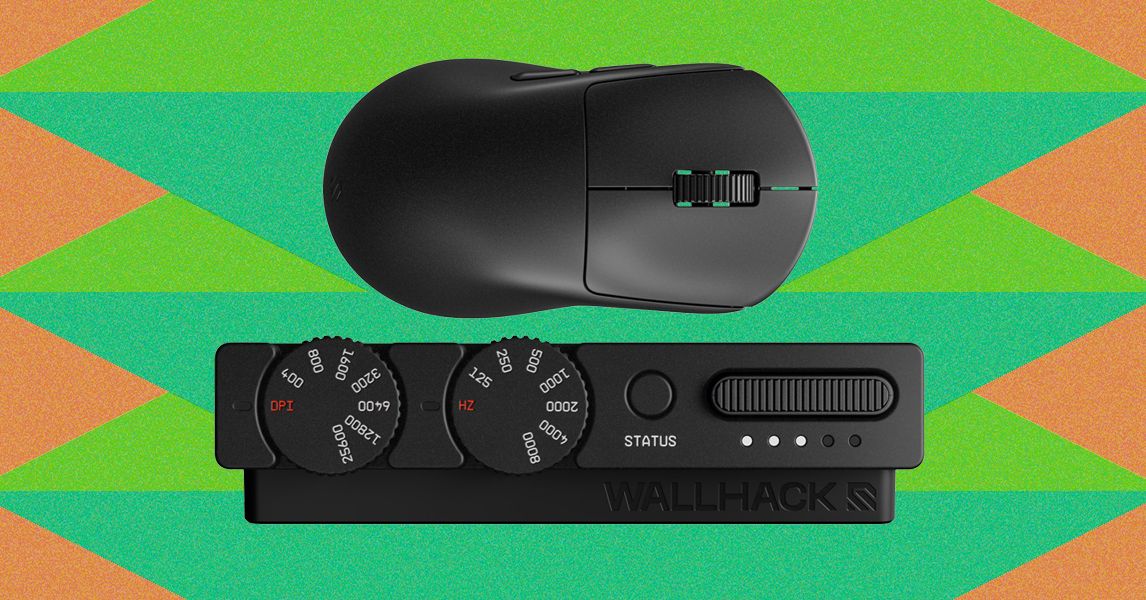
With the M-001, nearly all of these issues are resolved: The dongle is given purpose, function, and I’d even argue dignity. Instead of the small, existing-by-necessity designs that most manufacturers ship with their mice, Wallhack has managed to make a beautiful piece of industrial design. The dongle is a medium-sized metal wedge sporting a gunmetal gray finish identical to the mouse. It has two camera-like dials up front, a button, and a slot for a rechargeable battery. The DPI dial features numbering from 400 to 25,600, and the polling dial goes from 125 Hz to 8,000 Hz.





Leave feedback about this